Showing posts with label smartphones. Show all posts

Wednesday, June 12, 2013

HOW TO INSTALL BLACKBERRY THEMES WITH DESKTOP MANAGER

Instructions for Installing BlackBerry Themes Manually

Installing a just downloaded theme to your blackberry device manually with Blackberry Desktop Manager may not be as easy as installing the theme from a .jad file straight from the internet( Over The Air (OTA)method ).

I will be walking you through the stages involve in doing this with just less than 7 steps. All you have to do is download the Zip file or folder containing the theme, either from blackberry world or http://www.umnet.com/download-theme and follow the rest instruction.

First As a blackberry user I want to assume you already have a blackberry Desktop manager installed on your PC. or you can download a copy for the sake of this brief tutorial.

  1. You can now launch your Blackberry Desktop Manager Software with your blackberry device connceted Via UsB
  2. On the main Menu click the application Loader tab to get started.


  3. The next screen that comes up will show you the ADD/REMOVE APPLICATION area, proceed by clicking the start button. This is because your blackberry regards all themes as app and will install them on command


  4. On clicking the start button, the desktop manager prompts you to select location for the theme you want to install. You should note that the zip folder must be extracted, and the location of the .alx or .ali is where you will navigate to when you click the BROWSE button.


  5. Is now left for your BB DesKtop Manager to run and check for the validity of the chosen file and make it available on the
    Device Application Selection as shown in the picture above
  6. Select the themes you would like to install from the list shown. Did you notice the Action column? Make sure you check for install as the action to take before proceeding to the next step. To proceed to the next step. Do click Next Button.
  7. Remember I told you, Blackberry Recognizes themes as Apps. After clicking next the message that reads on the next screen will read:


    The following applications will be added or updated on your device.

  8. Click the FINISH BUTTON to start Theme installation immediately. At this point you should not disconnect or do any thing to interrupt the task in progress.
  9. After that you will get a message that will tell you whether it was successful or not. If you followed the steps above carefully then sure it you will get this message:
    The loading operation was successful

Now you are done and go for the theme on your device and select your newly installed theme.


You May Also Like:

  • How to Use your Blackberry As a MODEM
  • How to Create and customize a Blackberry theme
  • cheers!!!

    Saturday, June 8, 2013

    IF YOU HAVE AN EMAIL ADDRESS THEN READ THIS

    INTRODUCTION

    If you have an email address and you really want those spam messages to stay clear off your inbox, then you have to read this. Almost like everyday, most internet users gets chunks of spam messages being delivered into their inbox without their consent. And they are left with the question "how did this [***SPAMMER***] get my email address ?". How the sender got your email may not be issue but how often you keep exposing your email address and he/she keeps sending you that annoying crap or story line always. But sometime it is more easier to blame it on yourself due to carelessness on our own part ( I mean no offense). By doing so, you leave SPAM BOTS and spammers who uses Email Extractors to have quick access to your Email address.

    That's why I don't buy the Idea of you Leaving your e-mail address on my blog (...you will be doing so at your own risk). Instead I see no wrong making use of the comment box below if ever you want to be heard or pass across any information for users and visitors of this blog.
    If you really want to stop receiving those Spam messages (unwanted messages), then you must harken to the rest instructions and steps listed below in this post

    To stop receiving spam Emails on Yahoo! Mail. Log on to Yahoo! Mail on your DESKTOPand place search out the spam email. (likely to be in your spam folder)

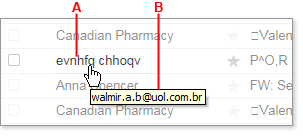
    Place the cursor over the sender's name in your mail folder. The real email address should appear in a tool tip.

    From the Image below, you can see, the labellings A and B


    A. carries the sender's name while B. tells you the real email address of the sender. ( Take Note)

    Wait a minute I think I should make something clear here before we continue You may still get the same type of spam messages timelessly even if you end up blocking the sender with the below steps. Some spammers are very crafty and uses different names with the same domain, such as xpangoxc.a.b@vbi.com.hk and mssoretk.c.b@vbi.com.hk.
    In this case, you are to block the domain and not a specific email address or even the both. For instance, from the illustration above, you're to block the uol.com.br. domain name. If you must also know, on the other hand some spammers are not predictable in how they create their addresses, as such my suggestion concerning blocking the both may not guarantee you to stop receiving spam messages completely. although it might reduce the messages from Spammers.

    Click the gear icon (Gear Icon) in the upper-right corner of the window, and select Mail Options from the menu that appears. (In Mail Classic, select Options | Mail Options.)
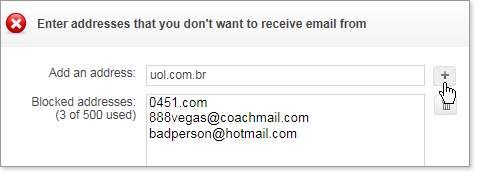
    On the left pane of the Options page, click Blocked Addresses (in Mail Classic, click Spam). In the Add an address box (in Mail Classic, Add a Blocked address), type the email address or domain of the Spammer that you want to block forever.
    Click the "+" button to the right of the box (in Mail Classic, click Add).

    Block address

    The address or domain is added to your list of blocked addresses, and you should no longer receive email from that address. You can use this method to block up to 500 email addresses and domains from different senders. You are also able to see how many you've blocked on the left side of the list, for example, "3 of 500 used." Please note that in cases where the spammer uses a Yahoo Id, Only the Email address should be blocked Not the Domain Name. Blocking the domain can stop you from receiving emails from other Users with yahoo ID

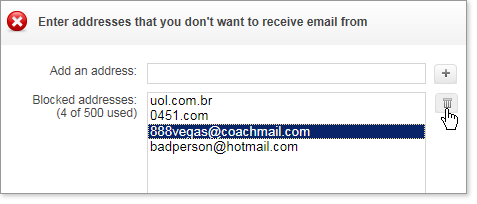
    To Ublock Address


    To Unlock any Email address, Simply select the email address you want to remove from the list and click the Trash Can Icon as shown above, to remove the address from your block List.

    THATZ ALL

    Saturday, May 18, 2013

    DOWLOAD THE LATEST OPERA FOR ALL DEVICES HERE

    Due to the Large traficc i get from users using operamini and opera browser to browse this blog. I have decided to provide you with links to download opera for your pc and mobile Gadget of latest versions. Below you can find the Latest opera mini download links for your smart phones. Download opera mini for your Black berry, Android, iphone and the rest...


    Related Post:

    Android download opera
    iPhone Dowload opera Version 7.0.5 for iOS 6 (also works on Ipad)
    Other phone Users can download it
    here

    DOwnload opera for Window, Linux and MAC respectively too

    WHATS NEW?

    Fix for Discover on low- and very high- dpi devices on Android includes
    - Chromium update
    - Fixes for some 3G configurations
    - Translations improvements
    - Various stabilization fixes
    For iphone and Ipad - Integration with iOS Facebook framework (iOS 6)
    - Improved performance when saving large images
    - Fixed freeze after sharing via email
    - Fixed video playback on youtube.com (iPhone and iPod)
    - Performance and stability fixes
    - Added support for iOS 4.2
    - Various iOS 6 related fixes

    ENJOY

    Friday, May 17, 2013

    7 THINGS TO DO IF YOUR PHONE KEEPS RESTARTING

    many mobile users have been noted to have complains of phone that keeps restarting. There are several obvious reasons as to why your phone may keep restarting. I have taken some some time to explain some of the common reasons below and instructions you can adhere to fix such bug.

    1. UNINSTALL NEW APPLICATION

    Many mobile gadget users gets a timeless phone restarting bug the moment they install new applications that are partially or not compatible with their devices.Sometimes times they may erroneously attribute it to having installed a virus infected application. But that may not always be the case. The possible solution is to do away or undo installation to get rid of the installed files. If you are a java phone user, and you have an antivirus installed , then you should completely uninstall it 'cus it is totally needless.

    2. DO AWAY WITH OLD SIM

    Yes! you may have to do away with that old SIM on your mobile and learn how to make a replacement for that. Do this after you must have tried putting away that old SIM for like days to examine the performance of your phones. If the Old SIM happens to be the reason why your phone keeps restarting, then do a welcome back.

    3. FORMATTING YOUR DEVICE

    The next resort after the 2 mentioned steps above is to format your Mobile device .Formatting helps to do away with all foreign objects and files that are malicious and harmful to your device. Dial *#7370# on your home screen and next, enter lock code. Don't forget to back up all files and folder and contacts stored in your phone or else you may end up loosing them.

    4. SCAN YOUR PHONE WITH ANTIVIRUS

    Do a thorough scan of all files and folder on your mobile drives if you have to. You can scan them with your antivirus on PC.

    5. KEEP PHONE AWAY FROM EXTREME TEMPERATURE

    Exposure to extreme conditions (for instance, exposure to the sun for long hours) can make an electronic device reboot. In addition to that, it is 'unhealthy' for the battery.

    6. VISIT A QUALIFIED MOBILE TECHNICIAN

    After all these steps above then you can assert is sure is for sure a hardware issue. If everything fails, it is more likely to be a hardware problem. In this case, you have to take your device to a near Nokia Care point. Remember to bring your warranty proof with you.

    7. UPGRADE YOUR DEVICE FIRMWARES

    Updating your firmware resolves any issues that may be found in current firmware version as well as it keeps your device updated and fixes a lot of bug. Many phones respond positively to firmware upgrade and trust me, it works like Magic. But you should only do this after the above steps must have proved abortive.

    HAVE FUN!!!

    Wednesday, May 15, 2013

    LATEST: THE RELEASE OF NEW BLACKBERRY Q5

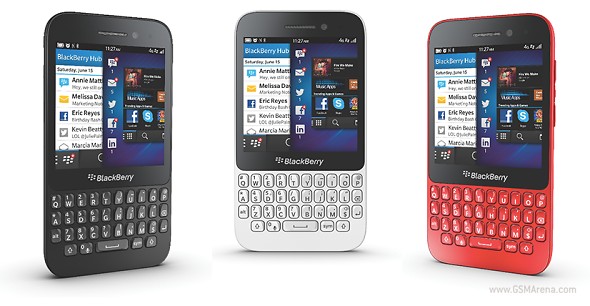
    As part of activities that followed the 2013 BlackBerry Live 2013 annual conference today 15th of May, 2013 in Orlando, USA, was the announcement of the New BlackBerry Q5.

    Features of the New BLACKBERRY Q5

    The Features of the new Blackberry Q5 includes:

    • A 3.1-inch touchscreen
    • A classic physical QWERTY keyboards
    • An LCD unit of 720 x 720px unusual screen resolution of the same size as Blackberry Q10.
    • A dual-core 1.2Ghz CPU and 8GB worth of mass storage.
    • A microSD slot
    • Non-removable battery.


    The new BlackBerry Q5 will be available in stores prior to the slated date for global distribution to various localities starting from JULY with selected markets in Europe, the Middle East, Africa, Asia (including the Asia Pacific region), and Latin America. The New BB Q5 will be for sure available in black, white, red and pink colors for you to make your choice.

    Another announcement that came from the today's keynote is that the BlackBerry 10.1 update is now ready to seed to the BlackBerry Z10 (later this month in the US). Don't also forget that as from today, Skype will be available to all Blackberry users who update their Z10s to v10.1.

    Monday, May 13, 2013

    USE YOUR ANDROID AS MODEM TO BROWSE FREE

    Knowing that you can actually exceed and exhaust the ways you can connect your mobile phone to the internet make it wonderfully awesome and alluring. And its also a letdown if you cannot employ all the tactics to do this. Today, I just found out a new way on how you can connect your android phone as a modem. All through this blog i have posted ways you can connect various mobile devices to the internet and how they can serve as a modem to the user

    You can check out the following links to learn More
    How to Use your Nokia As Modem
    How to use your iPHonE As a 3G ModemHow To Use Your Blackberry Phone as a Modem

    All you need to tether your internet connection on an Android device is as simple as getting yourself the PDAnet app and you can find it available at Google play store.

    I've tested this on a friends android and it worked fine and I was able to connect without out any hitch. In fact after a successful connection, I decided to share it with you guys on my blog. I never knew PDAnet was that great. The only thing is that you are subjected to a certain trail period where the software gives you every functions of a full version for some days. After the trial period, connections via https(secured connections) are disabled. by that you are are unable to login in to sites with secured connections. For example you wont be able to access your Facebook account because it is on a secured connection. You can check here for more details about the full version


    You can download the full version of PDAnet for FREE!!!!

    HOW TO CONNECT YOUR ANDROID AS A MODEM

    Instructions:Let me assume you just downloaded the app from the link I provided above for your PC and install it in a hurry so we can get started. And please spare me the question of how to configure it, because neither you nor I will be needing it for this tutorial. Once your android device is configured then you dont have to bug your nerves.

    Okay now download PDAnet for your android phone and install it too and enable USB Tether.

    HOW TO CONFIGURE YOUR ANDROID

    Go menu or Application Go to settings Go wireless networks Go to name access points In the APN screen that appears, press Menu and select New APN Only fill in the following fields: - Name: a name of your choice - APN: Set the name of the access point -
    Username (if required in your operator) - Password (if required in your operator) -
    Identification type choose PAP or CHAP -
    APN type select Internet Save all this by pressing Menu and Save

    Secondly, connect your android phone to your PC via USB cable instantly and that's all

    STILL CANT CONNECT YOUR ANDROID AS MODEM?


    if you still cant connect your android phone as a modem using the above steps then you can simply right click the PDAnet tray on your system task bar and click Connect to the Internet.


    After a sucessful connection you can Make use of airtel's BIS (blackberry Internet Service) Data Plan on your android to browse free.... SOUNDS KOOL RIGHT? PDAnet is also available for other OS such as Palm OS, Blackberry, iOS and Windows Phone and can equally be used on Mac OSX.

    Have Fun…