Showing posts with label iphone. Show all posts

Monday, June 3, 2013

HOW TO GET AUTOMATIC APN CONFIGURATION SETTINGS FOR ANDROID

Tweaker is sure one of those great app you will find in Google Play store and other app stores around the web to magically configure your smartphone internet settings. Tweakerker makes it quicker to set and configure your phone APN, MMS, and GPRS in a giffy. one crazy thing is that you just need a three to four clicks to get everything working silky smooth with your internet connection

I don't have much time to explain how this shit works. Ever since i stumbled on this app and how it works. I've been able to respond reliably to request from mobile phone users with various network provider on How to configure their smartphone for accessing the web.

This pretty app works in three 3 distinct ways:

  • 1. it selects your operator or service provider from a default list covering over countless services provider from over 220 countries.
  • 2. Sets up up internet and MMS APN for sending photos over edge/GPRS/3g networks.
  • 3. Selects a subscription plan too for your network.

I've this conviction that, no any other APN Manager does the clean job of setting up internet connection on your android as tweakker.

There's is no harm in giving tweakker a trail as it is very much free of charge to use. that is to say you pay $0.00 for using this app.

You can download the Latest version of tweakker here for full support.

HOW TO USE TWEAKKER ON YOUR DEVICE

its Just a three to four clicks to settle your android internet connection.

First download and install the app normally


Launch the app to come up with the screen to begin set up of your internet connection. Then Click Begin Setup

Select your network provider or operator from the Hugh list shown. see the image below!

After selection of your network operator, click on the confirm button and wait for just a second for settings to be loaded.

After that, your default APN settings will change automatically after Tweakker Loads your selected Settings

You can now launch your device's browser and start surfing.


ENJOY

Friday, May 17, 2013

7 THINGS TO DO IF YOUR PHONE KEEPS RESTARTING

many mobile users have been noted to have complains of phone that keeps restarting. There are several obvious reasons as to why your phone may keep restarting. I have taken some some time to explain some of the common reasons below and instructions you can adhere to fix such bug.

1. UNINSTALL NEW APPLICATION

Many mobile gadget users gets a timeless phone restarting bug the moment they install new applications that are partially or not compatible with their devices.Sometimes times they may erroneously attribute it to having installed a virus infected application. But that may not always be the case. The possible solution is to do away or undo installation to get rid of the installed files. If you are a java phone user, and you have an antivirus installed , then you should completely uninstall it 'cus it is totally needless.

2. DO AWAY WITH OLD SIM

Yes! you may have to do away with that old SIM on your mobile and learn how to make a replacement for that. Do this after you must have tried putting away that old SIM for like days to examine the performance of your phones. If the Old SIM happens to be the reason why your phone keeps restarting, then do a welcome back.

3. FORMATTING YOUR DEVICE

The next resort after the 2 mentioned steps above is to format your Mobile device .Formatting helps to do away with all foreign objects and files that are malicious and harmful to your device. Dial *#7370# on your home screen and next, enter lock code. Don't forget to back up all files and folder and contacts stored in your phone or else you may end up loosing them.

4. SCAN YOUR PHONE WITH ANTIVIRUS

Do a thorough scan of all files and folder on your mobile drives if you have to. You can scan them with your antivirus on PC.

5. KEEP PHONE AWAY FROM EXTREME TEMPERATURE

Exposure to extreme conditions (for instance, exposure to the sun for long hours) can make an electronic device reboot. In addition to that, it is 'unhealthy' for the battery.

6. VISIT A QUALIFIED MOBILE TECHNICIAN

After all these steps above then you can assert is sure is for sure a hardware issue. If everything fails, it is more likely to be a hardware problem. In this case, you have to take your device to a near Nokia Care point. Remember to bring your warranty proof with you.

7. UPGRADE YOUR DEVICE FIRMWARES

Updating your firmware resolves any issues that may be found in current firmware version as well as it keeps your device updated and fixes a lot of bug. Many phones respond positively to firmware upgrade and trust me, it works like Magic. But you should only do this after the above steps must have proved abortive.

HAVE FUN!!!

Thursday, May 16, 2013

APPLE I PHONE 4 IN NIGERIA N48,000 BLACKBERRY HUB IKEJA 08032271101

Uk Fairly used and clean with six
months guarantee . Unlocked and
Ready to use .  In good condition
. Call to make an order today or pay us a visit at
Blackberry Hub opposite Uba bank at
medical road computer village
ikeja lagos . Delivery via
courier/ waybill also available to other
states Tel 08032271102 . . . .

Wednesday, May 1, 2013

NEWLY LANCHED GOOGLE SEARCH APP FOR iOS DEVICES IS NOW AVAILABLE

And finally Google just made it official as she launches the new google search application on iphone and other devices using iOS. This means users of iOS gadget like iphone, and ipad can conveniently make use of Google search and display Google search result. like they will do on their web browser. The app bears similar looks and feel with the Android Google search app.

This serves as a stepping stone that shows more Google products and app will now be available for iOS Users as well. The main differences between Android and iOS are few, mainly in that iOS can display fewer different kinds of cards. "The types of Google Now cards available are largely the same on both platforms," says Baris Gultekin, Director of Product Management for Google Now.

Differences betwwen the new iOS Search App and that of Android

On iOS, it is so imposible to launched the Google Search app with a system-wide shortcut (unless you are a jail breaker) and it can't do the same kind of background sync that Now can do on Android. However, Google tells us that it will support the iOS background location feature, so that at least it won't need to spend as long hunting for your position when you open up the Search app. It also won't use iOS' notification system to push high-priority Now alerts as you can do on Android. 22 of the 29 card types available on Android are making their way to iOS, and the few holdouts include airline boarding passes, Fandango, and local events. Google Now will be able to display your next available appointment, but it will only pull that information from your Google Calendar, not the local calendar.

Android, of course, allows Google Now to be accessed with a swipe-up or long-press of a button on some phones, but it's worth pointing out that it might actually be available on fewer devices than on iOS thanks to minimum OS requirements.

Apple's hardware, Google's cloud services

Google has long said that it wants to make its services available on as many platforms as possible, but recent moves indicate that, when it comes to mobile, those platforms mainly include iOS and Android. It's notable that Google isn't holding back some of its best service features as Android exclusives, but Gultekin points out that Google still believes that Android offers a superior feature set for its products: "As with many Google products, Android (and Nexus devices) always give you the best Google experience, but we aim to make our services available to as many people as possible. Android offers more integration opportunities than iOS." Even so, the number and quality of Google's apps on iOS mean that heavy Google services users don't have as much incentive as they once did to stick with an Android device.

The updated Google Search app with Google Now is available in Apple's App Store now.

Wednesday, April 10, 2013

TOUBLESHOOT INTERNET CONNECTION ON WHATSAPP

Reasons Your Iphone May fail to Connect To The Internet

In some occasion, you may encounter rare cases and issues sending or receiving messages, photos, or videos, and unable to connect to the internet. This may probably be as a result of your phone's internet connection, or a problem with your wireless carrier or Internet service provider.

Most connections issues can be resolved by adhereing to the following:

Basic troubleshooting

  • Confirm you are using the right configuration settings with the right mobile Operator Sim or you're subscribed to a data plan of your choice
  • Restart your iPhone
    • Hold the On/Off button until "slide to power off" appears. Slide to power off your device. When it is off, press the On/Off button to turn it back on
      In iPhone Settings, Turn Airplane Mode ON then OFF
    • In iPhone Settings > General > Reset > tap [Reset Network Settings] (This will delete all your saved Wi-Fi passwords)
    • Upgrade or restore your iPhone's iOS to the latest version for your device. See this article for instructions. 

    If you use an unlocked iPhone or a pre-paid SIM card, then you may need to adjust your phone's APN settings for your SIM card. Please you can make use of this blog's search bar and search this blog for previous posts I have rendered on this.

    If your school or the corporate organisation where you work has Wi-Fi that has firewall restrictions in place, then you should contact your network administrator for help with accessing the internet Wi-Fi network.

    Cheers!!!,

HOW TO CHAT USING WHATSAPP ON YOUR DESKTOP COMPUTER

Yes this one is no joke.You can really download and chat live on whatsapp using your PC and laptop. Everyone knows whatsapp to be an interesting mobile chat platform and covers a wide range of users across the globe. This app competes fairly with most mobile chatting softwares like blackberry messenger (BBM), 2go, Ebuddy, mobile yahoomessenger, gtalk, facebook, and a host of others and known to be only available for mobile phone users. This PC version does not need a mobile emulator or Jar emulator to execute itself. its a complete ".exe" file which is functional like the mobile version and can be readily installed on your computer. With whatsapp PC version chatting(messaging), photo sharing,texting and video sharing is as easy as never before

Whatsapp is available for free download on windows 7, windows XP, windows Vista e.t.c

Related Post: How to gain unlimited acess on whatapp with Just 100 on Airtel

Features of The New Whatsapp PC Version

    * It has the ability to include videos, images and memos when sending message across the mobile devices.
    * Your families and friends can also be added on one Chat add.
    * The smileys are also one of the options available which are funny and are also available for the computers. On the computer there are the standard smileys with even the extra smileys.

Note: When the WhatsApp is used on the computer, then different numbers should be used for the PC and the mobile phone otherwise the this application on the mobile gets disabled.


More Tips and trick on Whatssap to come up soon!

See dowload link for whatsapp PC version below

WhatsApp for PC Save file and run installation like normal PC program

Whatsapp Download link For your Windows Phone:

WhatsApp for Windows Phone

Whatsapp dowload link For Nokia S4o

WhatsApp for Nokia S40

whatsaap For your Nokia Symbian:

Download link for WhatsApp on NokiaSymbian

For Blackberry:

Download WhatsApp for BlackBerry

For Android Phones:

Download WhatsApp for Android

To download it for iPhone you will have to install iTune . It is free of charge:

iTune 10 Download Free

Now you can download WhatsApp for iPhone. For this click:

Download WhatsApp for iPhone

Tuesday, March 26, 2013

APPLE FIXES BUG FOR SCREEN LOCK FLAWS

Apple says its latest update to the iOS 6 operating system fixes a security flaw that could allow access to an iPhone by circumventing the phone's lock screen. Version 6.1.3 of iOS for the iPhone, iPad, and iPod Touch was released Tuesday, CNET reported. Using the previous vulnerability, a person could execute a series of operations that including making a emergency call that would result in the phone's lock screen being bypassed, allowing them to make calls and listen to voice mails. The update, which users can download to their phones for installation, "contains improvements and bug fixes," including the fix for "a bug that could allow someone to bypass the passcode and access the iPhone app," Apple said on its website. In addition to the security fixes, the iOS 6.1.3 update also adds improvements to Apple Maps in Japan. The lock screen flaw was discovered last month, but a subsequent 6.1.2 update to fix an email problem left the flaw in place until today's update.

Saturday, March 23, 2013

HOW TO BACK UP CONTACTS FROM IPHONE TO ANDROID

Hi
Do really want to switch from an iPhone to an Android, and you're somehow afraid of loosing those important contacts on your phone.
Switching from an Iphone to Android is not only about changing the brand name but also involve an entire change in the operating system which may be stressful when trying to sync datas between the both and may also result in incompatibility of file format .

This tutorial makes it easy for you to transfer your private datas such as Contacts, Mail and Messages, and drafted notes using the Google without installing any app to help you do this. Contact method.
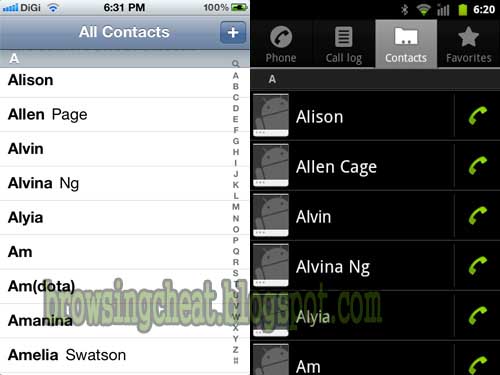
All you need first is a transfer of your current contacts from your iPhone to Google contacts, This will serve as a back up for all your contacts which will be later restored through the given steps below

This can be achieved in two different ways, one with
iTunes and the other with the
iCloud.

Steps to Sync Contacts

Using iTunes to sync contacts to andriod

First you must have a Google account (gmail account) and secondly, do a manual backup of your iPhone to your computer using Itunes.
You can check out the photo below to learn more

First, open iTunes program on your computer. Click here to download Itunes latest version
Connect your your iPhone device to your computer via USB.

    Select your iPhone in iTunes. Find the ‘Info’ tab and select Sync Contacts with Google Contacts

    After that, you will promted to enter your Gmail email address and password. Just chill and Wait as all contacts gets synced. Once syncing is successfully achieved, you can check out the outcome by directly heading over to your Gmail account via your device browser and quickly log on to your account. Go to Gmail > > Contacts.

    You’ll discover that all your iphone contacts just got imported to your Google account Contacts.


Alternative method


Using iCloud.com to sync contacts to Android

To use this method, you must have had your important datas backed up on your iPhone to iCloud.com

login to your iCloud account as shown in the image below.
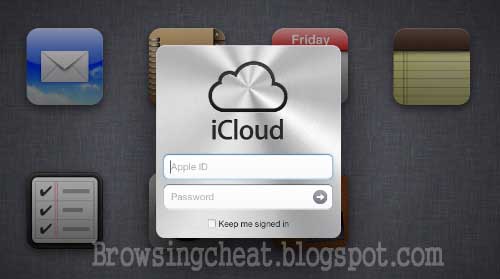
click on Contacts and you will see all of your backed up iPhone contacts in iCloud.

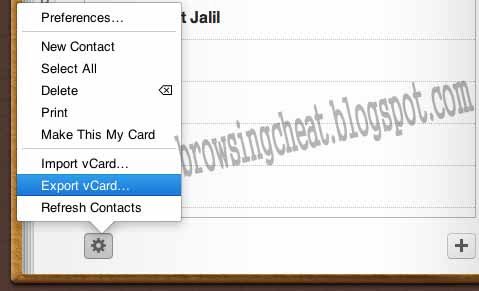
Hold downCtrl + A (Windows User) or Command + A (MAC users) to select all of your imported contacts, click on the Settings at the bottom left, then select "Export vCard…".
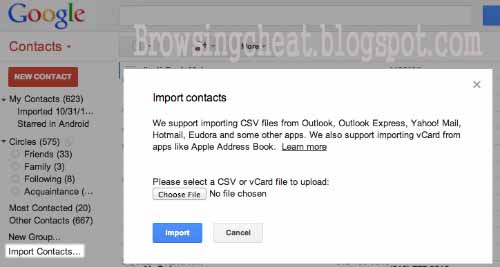
Login to your Gmail and go to Gmail > >Contacts.

After that, click on ‘Import Contacts…’ and an alert will be prompted. select your exported vCard… file and click Import to import all iPhone contacts to Google Contacts.
2. Merge Duplicate Google Contacts

Once you’ve imported iPhone contacts to Google Contacts, you can get rid of duplicate contacts before restoring your contacts on your phone to avoid repeatation of contacts. You may choose to do this on on your computer than on your smartphone.

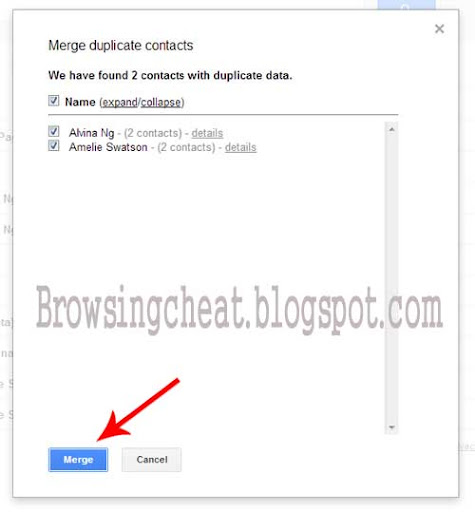
Click on More and then click on Find & merge duplicates...

A page with the names of duplicated contacts will pop up. After going through the names, select those that have duplicate contacts and Merge them.
3. Steps in Restoring Backed up Contacts on your Android device

After a succesfully exported and merged duplicates of your iPhone contacts to Google Contacts, you can start the process of restoring it to your Android phone.

Go to Menu > Settings > Accounts and Sync. on your Android phone. Tap on Add Account and select Google.
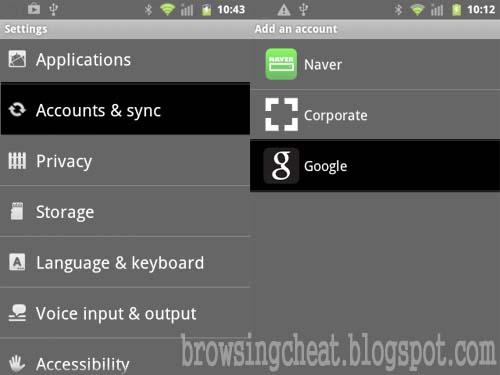
Then, click on Sign in and key in the Gmail account you used to sync your contacts to.

You can some seconds to Wait for communications to the Google account Servers to be fully established. This will land you a page where you’ll given options on what you want to sync into your phone. Tick ‘Sync Contacts’ and tap on Finish.to finally complete the action
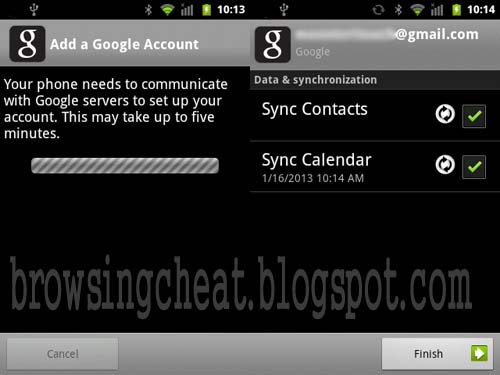
With that, Hurray you’re done! You can verify that by simply checking your Android phonebook.

One great thing about using Google Contacts to sync your contacts is that even if you lose your phone or switch to another smartphone, you will never lose your contacts. They are kept save within your Google account.

You can drop off any comment concerning this guide below via the comment box. Thanks!

Wednesday, February 20, 2013

INTRODUCING MTN MICRO SIM- ALL YOU NEED TO KNOW

MTN Micro SIM For Apple IPad & IPhone4 Users MTN just introduced the special Micro SIM cards that's compatible with any new model of smart devices and tablet PCs. These new micro-SIM cards are smaller in size than the standard SIM card and specially manufactured for devices including the Apple Ipad and Iphone 4. The Micro SIM will facilitate pleasureable and a heck free Internet access via the MTN SIM Plus menu. How To load airtime on your Ipad: Goto Settings> Cellular Data> SIM Applications> SIM Plus Under SIM Plus, go to My Tools and select Recharge. To activate data bundle on your Ipad Go to Settings> Cellular Data> SIM Applications> SIM Plus Under SIM Plus, go to My Tools and select Data Bundle. Wait for the next prompt. Select preferred data Bundle and wait for a confirmation prompt. PS: You need the latest version of MTN SIM Plus to do this How To get the latest version of SIM Plus menu: (for customers who already have a MicroSim with an old menu) a. Go to settings> Cellular Data> SIM Applications> SIM Plus b. Under SIM Plus, go to My Tools and select Manage, you will receive a Prompt to install, remove or update. c. Select Update and wait for the next prompt. d. Select DATA Bundle and the menu will be updated. MTN customers will be the first in Nigeria to benefit from using the Micro SIM by just walking into any of MTN Service Centres and partner shops in your locality. The price of the Micro SIM card is N1, 000, and if bundled with a 5G data plan, goes for N8, 000 for all customers (both prepaid and post paid customers.) You can drop your comment below if have any question or want more info. Thanks

READ THIS BEFORE YOU BUY THAT DEVICE WITH OLED DISPLAY

It should come as no shock that Apple CEO Tim Cook is an avid proponent of the Retina display technology used in the latest generations of iPhones, iPads and MacBooks. But what might surprise you is the extent to which he'll pan the OLED displays that competing devices ranging from the Samsung Galaxy S3 to the Nokia Lumia 820 use. Cook told investors at a meeting hosted by Goldman Sachs Tuesday that the color saturation of OLED displays is "awful." "You should really think twice before you depend on the color from an OLED display," he said. Harsh words While we may not agree about OLED displays (which can often look quite nice, as anyone with a Sony PS Vita can attest), Cook went on to make a good point about the mobile arms race. Whereas many companies compete to get the highest specs on their devices, Apple "sweat[s] every little detail," Cook said. Focusing on the specifics of hardware - which seem abstract at best to your average consumer - is what companies who can't "create an amazing experience" resort to, Cook said. He said he thinks Apple's devices have the "best display" - no surprise there. All about the apps Superior display technology isn't all Apple has going for it; according to Cook, the Cupertino company paid $8 billion (UK £5.1B, AU $7.8B) to app developers over the years. Apple's app store has been incredibly successful. CNET reported in January that app store downloads passed 40 billion, 20 billion of which were in 2012, and as of October there were 700,000 apps available for download. "We built an ecosystem that is the best customer experience on the planet," Cook said during Tuesday's meeting. According to CNET's January report, app developers had made $7 billion (UK £4.47B AU $6.79B) from the app store. The meteoric rise of that number could be an indication of Apple's "enormous momentum," which Cook attributed to the aforementioned ecosystem.

APPLE SAMSUNG BATTLE NOT YET OVER- SAYS TECH PRESS

Apple's year-old iPhone, the iPhone 4S was the second best selling phone in the world during the fourth quarter, according to new data from research firm Strategy Analytics. The iPhone 5 was the best selling phone in the world for the quarter. The Samsung S3 was the third best selling phone. This is an important data point for anyone paying close attention to the tech news lately. Samsung is out-innovating Apple, according to some in the tech press. Others in the tech press claim that Apple's is blowing it by not offering a smartphone with a bigger screen. The fact that Apple's iPhone 4S and iPhone 5 are outselling Samsung's top of the line smartphone suggests that consumers don't think Apple is getting out-innovated. Consumers also don't seem to care about the size of the screen. What people want are iPhones. What stops Apple from competing with Samsung isn't screen size or features, it's price and distribution. That's why just about every single sell-side analyst is pounding the table for Apple to release an inexpensive iPhone to compete in developing markets.

TROUBLESHOOT SYNCING OF I PHONE WITH PC

Connecting iPhone to your computer
You may need to connect iPhone to your computer in order to complete activation. Connecting iPhone to your computer also lets you sync information, music, and other content with iTunes. Connect iPhone to your computer: Use the Lightning to USB Cable (iPhone 5) or 30-pin to USB Cable (iPhone 4S or earlier) provided with iPhone. Syncing with iTunes First you need to download a copy of itunes player Syncing with iTunes copies information from your computer to iPhone, and vice versa. You can sync by connecting iPhone to your computer, or you can set up iTunes to sync wirelessly with Wi-Fi. You can set iTunes to sync music, photos, videos, podcasts, apps, and more. Tips for syncing with iTunes • If you use iCloud to store your contacts, calendars, bookmarks, and notes, don’t also sync them to your device using iTunes. •if you made Purchases from the iTunes Store or the App Store online from Nigeria, they will be automatically synced back to your iTunes library from your iphone. • In the device’s Summary pane, you can set iTunes to automatically sync when your device is attached to your computer. To temporarily override this setting, hold down Command and Option key(Mac users) or Shift and Control (PC users) until you see iPhone appear in the iTunes window. • In the device’s Summary pane, just select “Encrypt iPhone backup” if you want to encrypt the information stored on your computer when iTunes makes a backup. You will see a lock icon to proof that your backups are Encrypted, and a separate password is required to restore the backup. If you don’t select this option, other passwords (such as those for mail accounts) aren’t included in the backup and will have to be reentered if you use the backup to restore the device. • In the device’s Info pane, when you sync mail accounts, only the settings are transferred from your computer to iPhone. Changes you make to an email account on iPhone don’t affect the account on your computer. • In the device’s Info pane, click "Advanced" to select options to let you replace the information on iPhone with the information from your computer during the next sync. • If you listen to part of a podcast or audiobook, the place you left off is included if you sync the content with iTunes. If you started listening on iPhone, you can pick up where you left off using iTunes on your computer—or vice versa. • In the device’s Photo pane, you can sync photos and videos from a folder on your computer.
You may also want to Set up wireless iTunes syncing, you can do that with the below steps: Just Connect iPhone to your computer. In iTunes on the computer, select your iPhone, click Summary, then turn on “Sync with this iPhone over Wi-Fi.” When Wi-Fi syncing is turned on, iPhone syncs automatically every day with itunes. Note (1) iPhone must be connected to a power source, (2) iPhone and your computer must both be on the same wireless network, (3) and iTunes must be open and is running on your computer too.
You can leave ur comments and questions if any and i will be glad to give you a reply on this. Thanks