Showing posts with label downloads. Show all posts

Wednesday, June 12, 2013

HOW TO INSTALL BLACKBERRY THEMES WITH DESKTOP MANAGER

Instructions for Installing BlackBerry Themes Manually

Installing a just downloaded theme to your blackberry device manually with Blackberry Desktop Manager may not be as easy as installing the theme from a .jad file straight from the internet( Over The Air (OTA)method ).

I will be walking you through the stages involve in doing this with just less than 7 steps. All you have to do is download the Zip file or folder containing the theme, either from blackberry world or http://www.umnet.com/download-theme and follow the rest instruction.

First As a blackberry user I want to assume you already have a blackberry Desktop manager installed on your PC. or you can download a copy for the sake of this brief tutorial.

  1. You can now launch your Blackberry Desktop Manager Software with your blackberry device connceted Via UsB
  2. On the main Menu click the application Loader tab to get started.


  3. The next screen that comes up will show you the ADD/REMOVE APPLICATION area, proceed by clicking the start button. This is because your blackberry regards all themes as app and will install them on command


  4. On clicking the start button, the desktop manager prompts you to select location for the theme you want to install. You should note that the zip folder must be extracted, and the location of the .alx or .ali is where you will navigate to when you click the BROWSE button.


  5. Is now left for your BB DesKtop Manager to run and check for the validity of the chosen file and make it available on the
    Device Application Selection as shown in the picture above
  6. Select the themes you would like to install from the list shown. Did you notice the Action column? Make sure you check for install as the action to take before proceeding to the next step. To proceed to the next step. Do click Next Button.
  7. Remember I told you, Blackberry Recognizes themes as Apps. After clicking next the message that reads on the next screen will read:


    The following applications will be added or updated on your device.

  8. Click the FINISH BUTTON to start Theme installation immediately. At this point you should not disconnect or do any thing to interrupt the task in progress.
  9. After that you will get a message that will tell you whether it was successful or not. If you followed the steps above carefully then sure it you will get this message:
    The loading operation was successful

Now you are done and go for the theme on your device and select your newly installed theme.


You May Also Like:

  • How to Use your Blackberry As a MODEM
  • How to Create and customize a Blackberry theme
  • cheers!!!

    Saturday, June 8, 2013

    IF YOU HAVE AN EMAIL ADDRESS THEN READ THIS

    INTRODUCTION

    If you have an email address and you really want those spam messages to stay clear off your inbox, then you have to read this. Almost like everyday, most internet users gets chunks of spam messages being delivered into their inbox without their consent. And they are left with the question "how did this [***SPAMMER***] get my email address ?". How the sender got your email may not be issue but how often you keep exposing your email address and he/she keeps sending you that annoying crap or story line always. But sometime it is more easier to blame it on yourself due to carelessness on our own part ( I mean no offense). By doing so, you leave SPAM BOTS and spammers who uses Email Extractors to have quick access to your Email address.

    That's why I don't buy the Idea of you Leaving your e-mail address on my blog (...you will be doing so at your own risk). Instead I see no wrong making use of the comment box below if ever you want to be heard or pass across any information for users and visitors of this blog.
    If you really want to stop receiving those Spam messages (unwanted messages), then you must harken to the rest instructions and steps listed below in this post

    To stop receiving spam Emails on Yahoo! Mail. Log on to Yahoo! Mail on your DESKTOPand place search out the spam email. (likely to be in your spam folder)

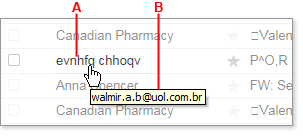
    Place the cursor over the sender's name in your mail folder. The real email address should appear in a tool tip.

    From the Image below, you can see, the labellings A and B


    A. carries the sender's name while B. tells you the real email address of the sender. ( Take Note)

    Wait a minute I think I should make something clear here before we continue You may still get the same type of spam messages timelessly even if you end up blocking the sender with the below steps. Some spammers are very crafty and uses different names with the same domain, such as xpangoxc.a.b@vbi.com.hk and mssoretk.c.b@vbi.com.hk.
    In this case, you are to block the domain and not a specific email address or even the both. For instance, from the illustration above, you're to block the uol.com.br. domain name. If you must also know, on the other hand some spammers are not predictable in how they create their addresses, as such my suggestion concerning blocking the both may not guarantee you to stop receiving spam messages completely. although it might reduce the messages from Spammers.

    Click the gear icon (Gear Icon) in the upper-right corner of the window, and select Mail Options from the menu that appears. (In Mail Classic, select Options | Mail Options.)
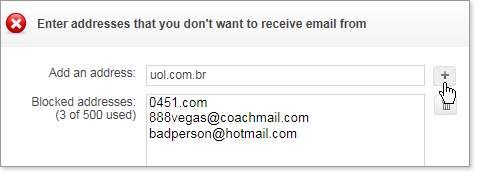
    On the left pane of the Options page, click Blocked Addresses (in Mail Classic, click Spam). In the Add an address box (in Mail Classic, Add a Blocked address), type the email address or domain of the Spammer that you want to block forever.
    Click the "+" button to the right of the box (in Mail Classic, click Add).

    Block address

    The address or domain is added to your list of blocked addresses, and you should no longer receive email from that address. You can use this method to block up to 500 email addresses and domains from different senders. You are also able to see how many you've blocked on the left side of the list, for example, "3 of 500 used." Please note that in cases where the spammer uses a Yahoo Id, Only the Email address should be blocked Not the Domain Name. Blocking the domain can stop you from receiving emails from other Users with yahoo ID

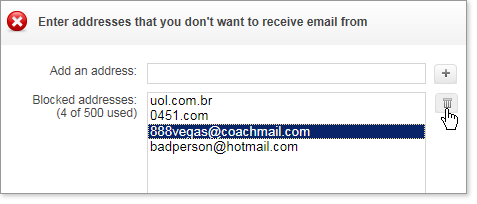
    To Ublock Address


    To Unlock any Email address, Simply select the email address you want to remove from the list and click the Trash Can Icon as shown above, to remove the address from your block List.

    THATZ ALL

    Wednesday, May 29, 2013

    HOW TO DOWNLOAD VIDEOS ON YOUTUBE WITHOUT ANY SOFTWARE

    Everyone knows youtube does not offer a download button for it users. A lot of people including I myself go to You-tube and other online video sites almost on daily bases to watch free online videos on several topics and happenings around the globe. While doing this you may stumble on a particular video you may want to keep on your hard drive.
    The question now becomes How do you do this( I mean How to download youtube videos). There are countless ways to download YouTube videos and videos from other online tube sites. I will be giving you a short and simple demonstration on how to download you-tube videos without installing any software. Yes! I mean without installing any free or paid software.

    The easiest way to download video from YouTube on your browser, is to download and install the YouTube Downloader extension for your Chrome Browser.
    This extension will surprisingly make available a download button on all YouTube page, with most preferred choice of the size and format available for download.

    I guess You already have a chrome Browser installed on your PC. Well if i guessed wrong then here is the download link to get chrome

    Related Post: How to download Youtube Videos on Opera Mini

    Installing Chrome YouTube Downloader

    to get started, Download the chrome extension that helps you do this from Here.
    Click on "Add to Chrome" After that a warning Dialog Box will pop-up with a warning message, simply click on "Continue"
    In the window that opens click "Install"


    You see a message indicating that the extension has now installed

    Downloading your videosOnce the extension installed: Go to YouTube and search out for any video you want to download.

    Did you notice the new "Download button" added. Okay that's because you successfully added the YouTube chrome extension Downloader. Several download options are available, choose to your convenience. After making your choice, Click "Download" to commence downloading immediately

    You can checkout the downloaded video on your chrome download manager by pressing Ctrl + J simultaneously on your keyboard to see how its downloading
    when Downloaded look for a media player that can play the video file format. video formats mostly available may be .FLV or .MP4

    Tuesday, May 28, 2013

    HOW TO LOCK DOWN AND SECURE YOUR PC WITH PREDATOR

    This post is about an unsual way to use your USB mass storage device as a tool to secure and lock down your computer for restricted access. Here, your USB mass storage serves a the key to unlock and lock down your PC. Once it is inserted into your Pc It automatically unlock your pc and when once removed, it locks down in a couple of micro seconds. Whether you like it or not a good security measure Is something everyone needs to pull by the side when dealing with anything in this life.

    To do this little trick, I will be introducing to you a window application called PREDATOR that helps you to do this. Predator is the window application you need if you are the security conscious type. It prevents others from hacking into your system files when you are not available. It's more convenient than closing your Windows session, if you ever have to and does not require you as an authorize user toretype your window password when you return.


    KNOW HOW IT WORKS

    Now let me come down to how this very little shit works.
    • Like I said earlier Predator helps you to lock down your Pc/laptop when you remove your USB flash (mass storage Device) while your widows session is still running by darkening your window screen and making your PC/laptop key board and mouse to become totally inactive for anyone or any unauthorized user.
    • One wonderful thing about this application is that it also helps as a tracker and keeps activity logs that enables you to know people who made attempt to use your computer.
    • Predator also helps you to set an alarm that keeps away or freak out intruders. Maybe you're are in a public place operating your Device and at the same time you have a "here and there" movement to do within that area, instead of getting so worried about who to look after or watch out for you PC, just relax and and keep your ears alert to hear an alarm when someone touches it and that's all.
    • Predator also disables ALT+CTRL+DEL on your system, this make it very hard and rigorous for for anyone who is up for a fast one to terminate and kill program process through TASK MANAGER in which predators will certainly happen to be among them.
    • Now come to think of if what if your USB mass storage gets missing... Yes it may happen but then you can still access your Pc with a special Password that you must Have created at the time of installing predator on your system. All that I am going to explain later On in this Post

    System Requirements for Installing predator

    PREDATOR is availble on the following operating systems:
    32-bit based systems
    Windows 8 (all editions)
    Windows 7 (all editions)
    Windows Vista (all editions)
    Windows Server 2008
    Windows Server 2003
    Windows XP SP3 (all editions)
    64-bit based systems
    Windows 8 (all editions) 64-bit
    Windows 7 (all editions) 64-bit
    Windows Vista (all editions) 64-bit
    Windows Server 2008 x64
    Windows Server 2003 x64

    PREDATOR will not work with other versions of Windows than those indicated. If the Microsoft .NET Framework 4 Client Profile is not installed on your computer, the PREDATOR installation program will do it for you.


    Download Predator forWIN 32Bit and WIN64bit

    HOw To Install Predator

    1. Download Predator free edition InstallPredator.exe and Install it in your PC.After installing run the application from Windows program menu or the desktop shortcut icon.
    2. You will get a message box like this Insert your USB flash drive and click OK to continue.
    3. Now the preference window will appear. Here you can set the screen darkness,start-up mode,and other options by checking in the check boxes.
    4. In the Change Password field put your new password when you are configuring 1st time. Select the Drive letter in your computer which indicates the USB drive of your computer. Now press “Create Key” button and it will successfully create the key file in your USB flash drive.
    5. Now click OK.
    6. Check in the system tray.If the Predator icon is blinking then everything you have done is OK an ready to lock your PC.

    STARTING OFF WITH PREDATOR

    To get started with this trick to lock down your PC for security purpose, all you have to do is adhere to all the steps Given below

    To start monitoring your PC
    Insert your key Run the software via the Start Menu / Programs / Predator item or via the PREDATOR icon on the Desktop Make sure that the PREDATOR icon flashes in the taskbar


    When you go away
    Look at the PREDATOR icon in the taskbar: if it is red, wait. If it is green and blinking, remove the key.
    The desktop will be locked in a few moments, depending on the settings you have chosen. If somebody tries to use your PC, PREDATOR shows the password dialog and starts a countdown.
    If an invalid password is entered, PREDATOR sounds an audible alarm and displays a blinking Access Denied sign.

    When you're back
    Insert the key. The desktop will be unlocked in less than a second. If somebody has tried to use your PC, PREDATOR automatically opens the Log window and shows the failed access attempts

    To stop monitoring your PC, temporarily or permanently
    Click on "Pause monitoring" or "Exit" from the context menu

    To verify or tell if someone tried to used your PC while you were away,
    Click on "View log" in the context menu and see all logged activities.


    FAQ:


    Can I make a copy of my USB drive and give it to someone else to use on my PC ?
    No, you can't make a simple copy because PREDATOR has a unique copy-protection scheme: if someone tries to copy a PREDATOR key, the copied key will be useless. If you need several flash drives to protect your computer, you must prepare them with the "Flash Drive" section of the Preferences window. For instance you can make a spare key to unlock your computer in case you lose your main key, or you can give their own keys to some trusted persons to allow them to use your PC. Return to FAQ's main index

    What is the minimum size of the USB drive needed to operate PREDATOR ?
    Any USB drive size will just be okay do so long as PREDATOR finds a 1KB free space to writes its protection codes and can be found on the USB Drive as "predator.ctl" and is located at the root of the drive.
    What if I lose/break my key ?
    This may be very risky. Its like locking your room and swallowing the Key Up(.....wondering where u r going to lay ur head to rest for that day). Now if this ever happens, then Run Predator, and wait for the screen to go blank, click anywhere on the screen with the left mouse button, then press the Enter key 3 times to display the password dialog box
    Kindly type your password as required to enable you have access once again
    Insert a new flash drive (mass storage Device)
    Right-click the PREDATOR icon found on the taskbar and click the Preferences item Prepare your key as shown in the paragraph USB Flash Drive in the Settings page. And that's all.
    What if I forget my password?
    Run PREDATOR as Administrator and click the "Reset Password" button, to reset your password,
    After that kindly Click the close button to quit the program

    You can click here for more Info about Predator Here!

    Saturday, May 18, 2013

    DOWLOAD THE LATEST OPERA FOR ALL DEVICES HERE

    Due to the Large traficc i get from users using operamini and opera browser to browse this blog. I have decided to provide you with links to download opera for your pc and mobile Gadget of latest versions. Below you can find the Latest opera mini download links for your smart phones. Download opera mini for your Black berry, Android, iphone and the rest...


    Related Post:

    Android download opera
    iPhone Dowload opera Version 7.0.5 for iOS 6 (also works on Ipad)
    Other phone Users can download it
    here

    DOwnload opera for Window, Linux and MAC respectively too

    WHATS NEW?

    Fix for Discover on low- and very high- dpi devices on Android includes
    - Chromium update
    - Fixes for some 3G configurations
    - Translations improvements
    - Various stabilization fixes
    For iphone and Ipad - Integration with iOS Facebook framework (iOS 6)
    - Improved performance when saving large images
    - Fixed freeze after sharing via email
    - Fixed video playback on youtube.com (iPhone and iPod)
    - Performance and stability fixes
    - Added support for iOS 4.2
    - Various iOS 6 related fixes

    ENJOY

    Wednesday, April 10, 2013

    TOUBLESHOOT INTERNET CONNECTION ON WHATSAPP

    Reasons Your Iphone May fail to Connect To The Internet

    In some occasion, you may encounter rare cases and issues sending or receiving messages, photos, or videos, and unable to connect to the internet. This may probably be as a result of your phone's internet connection, or a problem with your wireless carrier or Internet service provider.

    Most connections issues can be resolved by adhereing to the following:

    Basic troubleshooting

    • Confirm you are using the right configuration settings with the right mobile Operator Sim or you're subscribed to a data plan of your choice
    • Restart your iPhone
      • Hold the On/Off button until "slide to power off" appears. Slide to power off your device. When it is off, press the On/Off button to turn it back on
        In iPhone Settings, Turn Airplane Mode ON then OFF
      • In iPhone Settings > General > Reset > tap [Reset Network Settings] (This will delete all your saved Wi-Fi passwords)
      • Upgrade or restore your iPhone's iOS to the latest version for your device. See this article for instructions. 

      If you use an unlocked iPhone or a pre-paid SIM card, then you may need to adjust your phone's APN settings for your SIM card. Please you can make use of this blog's search bar and search this blog for previous posts I have rendered on this.

      If your school or the corporate organisation where you work has Wi-Fi that has firewall restrictions in place, then you should contact your network administrator for help with accessing the internet Wi-Fi network.

      Cheers!!!,