Showing posts with label steps to customize opera or remod opera. Show all posts

Wednesday, May 29, 2013

HOW TO DOWNLOAD VIDEOS ON YOUTUBE WITHOUT ANY SOFTWARE

Everyone knows youtube does not offer a download button for it users. A lot of people including I myself go to You-tube and other online video sites almost on daily bases to watch free online videos on several topics and happenings around the globe. While doing this you may stumble on a particular video you may want to keep on your hard drive.
The question now becomes How do you do this( I mean How to download youtube videos). There are countless ways to download YouTube videos and videos from other online tube sites. I will be giving you a short and simple demonstration on how to download you-tube videos without installing any software. Yes! I mean without installing any free or paid software.

The easiest way to download video from YouTube on your browser, is to download and install the YouTube Downloader extension for your Chrome Browser.
This extension will surprisingly make available a download button on all YouTube page, with most preferred choice of the size and format available for download.

I guess You already have a chrome Browser installed on your PC. Well if i guessed wrong then here is the download link to get chrome

Related Post: How to download Youtube Videos on Opera Mini

Installing Chrome YouTube Downloader

to get started, Download the chrome extension that helps you do this from Here.
Click on "Add to Chrome" After that a warning Dialog Box will pop-up with a warning message, simply click on "Continue"
In the window that opens click "Install"


You see a message indicating that the extension has now installed

Downloading your videosOnce the extension installed: Go to YouTube and search out for any video you want to download.

Did you notice the new "Download button" added. Okay that's because you successfully added the YouTube chrome extension Downloader. Several download options are available, choose to your convenience. After making your choice, Click "Download" to commence downloading immediately

You can checkout the downloaded video on your chrome download manager by pressing Ctrl + J simultaneously on your keyboard to see how its downloading
when Downloaded look for a media player that can play the video file format. video formats mostly available may be .FLV or .MP4

Saturday, May 18, 2013

DOWLOAD THE LATEST OPERA FOR ALL DEVICES HERE

Due to the Large traficc i get from users using operamini and opera browser to browse this blog. I have decided to provide you with links to download opera for your pc and mobile Gadget of latest versions. Below you can find the Latest opera mini download links for your smart phones. Download opera mini for your Black berry, Android, iphone and the rest...


Related Post:

Android download opera
iPhone Dowload opera Version 7.0.5 for iOS 6 (also works on Ipad)
Other phone Users can download it
here

DOwnload opera for Window, Linux and MAC respectively too

WHATS NEW?

Fix for Discover on low- and very high- dpi devices on Android includes
- Chromium update
- Fixes for some 3G configurations
- Translations improvements
- Various stabilization fixes
For iphone and Ipad - Integration with iOS Facebook framework (iOS 6)
- Improved performance when saving large images
- Fixed freeze after sharing via email
- Fixed video playback on youtube.com (iPhone and iPod)
- Performance and stability fixes
- Added support for iOS 4.2
- Various iOS 6 related fixes

ENJOY

Tuesday, May 14, 2013

TROUBLESHOOT NO GATEWAY REPLY ON YOUR NOKIA

Have you been trying to connect to the internet through a WLAN network and all you get is a fustrating "No Gate way" reply? Well i think I have some goodies for you.

Just try the following solutions given below to trouble shoot all that crap and get connected. Sure these will make things okay.


ADD YOUR PHONES MAC ADDRESS

1. Take some time to check properly to see if MAC address filtering is enabled on the router you are trying to connect to. Sometimes routers are set to filter Mac address from certain devices. your Mac address is what makes your device unique from another connecting device. if it is, you will need to add the MAC address of your phone to the "allowed" list.
Now the Big question is how do Iknow my Phones MAC address and how do I add it? Not to worry, Just Use the code *#62209526# to get your NOKIA phone MAC address.


CHECK FOR SUBNET MASK, DEFAULT GATEWAY AND DNS SERVERS

2.Click on Start>Run and type ipconfig/all on the laptop the router is connected to and pen down the settings for the following:
a) Subnet Mask
b) Default Gateway
c) DNS Servers
Now switch over to your mobile Phone
Go to Menu>tools>settings>connection>access points. Select your WLAN access point and go to Advanced settings then IPv4 settings.

WHAT'S MY PHONE IP ADDRESS?

Knowing your phone IP address as using the Default Gateway IP and alter the last number to whatever. You should take note as not to use the same IP with that of the Gateway IP of your COmputer.
For Subnet mask and Default gateway use the same with the one on your computer/PC For DNS address: Change to user defined and enter same settings as on PC


CHECK ROUTER FIRMWARE UPDATES

3. Check for firmware updates for your router and install if there is one.
4. Check or try a different channel settings on your router if you have to.
5. Disable WirelessLAN Power saving mode. To do this, goto Tools>Settings>Connection>Wireless LAN>Options>Advanced settings>Automatic configuration>change>Power saving, set this to disabled.
6. Disabling QOS (Quality of Service) has been known to trobleshoot this issue on some routers.

Saturday, April 20, 2013

DOWNLOAD YOUTUBE VIDEOS WITH OPERA MINI BROWSER

youtube video download in mobile

Watching YouTube online is one of the sure and prety way to enjoy and maximise time spent online for relaxation and entertainment. Virtually everything found on the web has a video or related clip which are mostly for tutorial purpose, and for passing other piece informations through visuals. However dowloading this videos to access them offline becomes another thing.

Currently, mobile phone users surfing YouTube websites regularly, find it very hard to watch and download videos from their mobile browsers. Only very few of them know to watch YouTube video on their mobile phones.

download YouTube video in mobile set

With the below instructions, popular mobile Internet browsers like Opera Mini and UC Browser can be used to download YouTube on the mobile phones. But, you may choose alternate option for downloading admired YouTube videos through savefrom.net.

How to download YouTube videos with savefrom.net in opera mobile browser?

Step-1

  • First of All, launch or load your opera mini browser on your mobile gadgetand type in Youtube URL link – like this; m.youtube.com
  • and hit enter

opera mobile browser youtube page

  • With that, the YouTube web page shoul load completely. Go to the search box located at the top of the youtube web page
  • Make a quick search of any video of your choice by typing in the keyword of the preferred videos that you would like to download.
  • Pick a video of your choice from the list of searched video results.
youtube video search in opera mobile browser
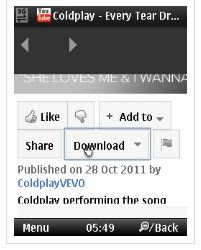
  • Next, go to the top of ur opera mini browser where you can find the address bar and copy the entire video URL address.

Step-2

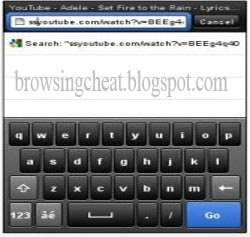
  • Quickly launch another tab in opera mobile browser and type ssyoutube.com in the URL address bar.
  • Then you will get text field of ssyoutube.com website, here you have to paste correctly the URL web address of the YouTube video.

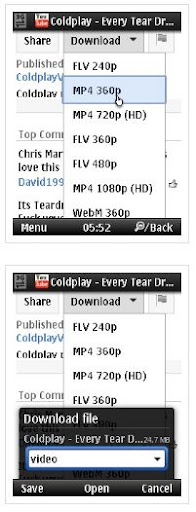
  • Finally, you can now click download to commense download of the selected YouTube video file.
paste youtube video url address in opera browser

download youtube video in mobile
  • You can selected an apropiate video file format e.g flv 240, flv480p, mp4 360, mp4 720(HD), web M360p e.t.c and dont forget to set target location where to save the video file after download is over.
paste youtube video url address in opera browser

Now you can download thons of youtube videos using the above steps for your Android, Blackberry, Iphone, Windows mobile, Samsung galaxy note and Nokia e.t.c YouTube videos successfully in your mobile phones, iPhone, Android, iPod, etc through above simple tips.

Wednesday, February 27, 2013

UNLOCK YOUR MOBILE PHONE MEMORY CARD

How To Unlock And brute force Memory Card When You mistakenly Forget Your Memory Card Password or passphrass Some times it happens that you forgot the password of your memory card and u just can't afford to loose all your data or have lots of your important data in your mobile phone. So i will disclose two of the methods used for recovering the password of your memory card with the help of Nokia phone. For Nokia s60 1st and 2nd edition phones.

1. Install F Explorer in your (c: drive)phone memory.


2. Got to drive C: ,and look out for a file named "mmcstore"

3. Send it to your pc or laptop and open it in notepad or any word editor and rename the file.

4. At the end of the file you will see your stored password.
For Nokia S60 3rd Phones, Nokia N-Series and Nokia E-Series

There is almost no way yet known to hack the memory card password in case of these types of phone but there is a way to do it some of the s60 3rd edition phones and almost all the E-series phones.

The remote lock option in E-Series phone allows you to unlock your phone by sending a sms.

The only thing you have to do is to activate this feature by going to Tools >> Settings >> security >> Phone and SIM >> Allow remote lock menu. The password of your memory card will be your remote lock message.

So you have to just send a sms containing your remote lock message that will automatically change your memory card password.

If you have any queries in following the above procedure leave a comment here.

Saturday, March 27, 2010

HOW TO MOD OR COSTUMIZE OPERA MINI FOR URSELF


Hey Guyz,
just a little digression to bring you
HOW TO MOD OR COSTUMIZE OPERA MINI FOR URSELF

all you have to do is to follow these simple steps
having said that now lets go there! or rather
come with me guys

REQUIREMENTS
OperaMini 4.2 UNmodifed please download
directly from opera website
HxD hex editor(this i know u already ve from my
other thread on cracking java)
WinRAR for extracting a.class, f.class and v file
Computer(most important of all)
pngout.exe program
Paint
Pixelformer
Splash image in .png format(as time progresses i
will let us know how to do this)
Scientific Calculator (u can simply use the one in
ur system cos that is what i used through out)
Kemulator( for testing ur work as u progress
please use without internet connection)

Topic 1. Embedding the Skin on v file
1. Open v file and the skin (pic u want to use
in .png) file in HxD hex editor.
2. Highlight all the contents of the skin file and
copy it. You may press Ctrl A then Ctrl C. Take
note of the value in Lenght indicator. This is the
filesize of skin in hexadecimal.
3. Goto the v file tab and press Ctrl F. Search for
"png" text string.
4. Highlight the bytes starting from 89 50 4E 47
0D 0A 1A or the address 00001DA0 x 0E until the
Lenght indicator reaches C7C.
5. Press Ctrl V to embed the skin image on v file.
Now we're ready to change those addresses
embedded in the v file. Change only the
addresses enclosed with the blue boxes.
These addresses are for unmodded v file and
often times changes if modifications were already
done on the v file.
6. Open the scientific calculator and put it in hex
mode. If the filesize of the skin in hex is greater
than C7C then subtract C7C from the filesize of
the skin. If the filesize of the skin is less than C7C
then subtract the filesize of the skin from C7C.
Take note of the the answer.
Add the answer in procedure 6 to the address
enclosed in a box in procedure 5. Change
them accordingly to the result of adding or
subtracting those embedded addresses
7. Save v file and exit HxD hex editor.
8. Open operamini 4.2 with WinRAR and drag the
v file from the desktop to operamini...jar.
9. Click Ok and close WinRAR.
10. Finally, install your modified Operamini...jar
on your phone or use microemulator on your
computer to test your work.

Topic 2. Changing the Welcome Page
1: First, we need a webpage address. For this
guide I will be using the address "http://
www.mozilla.com/en-US/firefox/firefox.html" as
my welcome page.
2. Open v file with HxD editor. Click the Edit menu
then click on Replace. At the Search for box, type-
in "http://www.operamini.com/firsttime/4.2/"
and at the Replace with box, type-in the URL of
your welcome screen. Click OK.
3. Highlight all the text that are red color and
takenote of the Lenght value. In the screenshot I
got a 31 hex.
4. Change the hex value of the character just
before "http" to the of length in procedure 3.
5. Now where done with editing the URL of the
welcome screen. The next thing to do is to
change the embedded addresses on the v file. If
the length value obtained in procedure 3 is equal
to 27 hex, then proceed to the next procedure. If
the length value obtained in procedure 3 is greater
than 27 hex, then subtract 27 hex from the length
and add the answer to each of the boxed
addresses. If the length value obtained in
procedure 3 is less than 27 hex, then subtract it
from 27 hex and subtract the answer to each of
the boxed addresses.
6. Save v file and exit HxD.
7. Test your mod.

Topic 3. Editing the server of OperaMini 4.2
1. Open HxDSetupEN.zip and double click
Setup.exe to install HxD hex editor.
2. Open operamini...jar with WinRAR and drag
the a.class file into the desktop. Minimize WinRAR
and don't close it.
3. Double click HxD icon to launch the hex editor
and open a.class file in it.
4. After opening a.class, click the Search menu
and then click Replace.
5. Type-in the "http://
server4.operamini.com:80/" in the Search for text
box and the server that you want in the Replace
with: text box. Then, click OK.
6. Highlight the text that are red in color and take
note of the value of Length: at the bottom.
In my screenshot, the Length is equal to 29.
7. Highlight the character before "http".. and goto
Edit menu then click Fill Selection...
8. Type-in the Hex-values text box the value of
the Length in procedure 6 and click OK.
9. Save the changes you made in a.class and
close HxD.
10. Drag a.class back to WinRAR and click OK to
save your work.
11. Finally, close WinRAR and install your modified
Operamini...jar on your phone or use your
emulator to test.

Topic 4. Changing the Startup Loading Bar and
Background Color

1. Open pixelformer and choose a color you want
for the loading bar and background. Take note of
its hex value.
2. Open f.class with HxD hex editor.
3. Find and replace the hex values AC 16 14 and FF
FF FF with any hex color you want. AC 16 14 for
loading bar and FF FF FF for the background
color.
4. Save f.class and drag it back to operamini.
5. Test your work on your phone or emulator